

Obsidian Metadata
| channel | Jay E | RoboNuggets |
| url | https://www.youtube.com/watch?v=tFCgmeOWlA8 |
| published | 2026-03-17 |
| categories | Youtube |
Introduction to OpenClaw
OpenClaw appears to be a framework or methodology related to AI agents, likely focusing on autonomous operations, code generation (ClaudeCode, CursorAI), and agency automation. The video promises simple explanations of complex ideas.
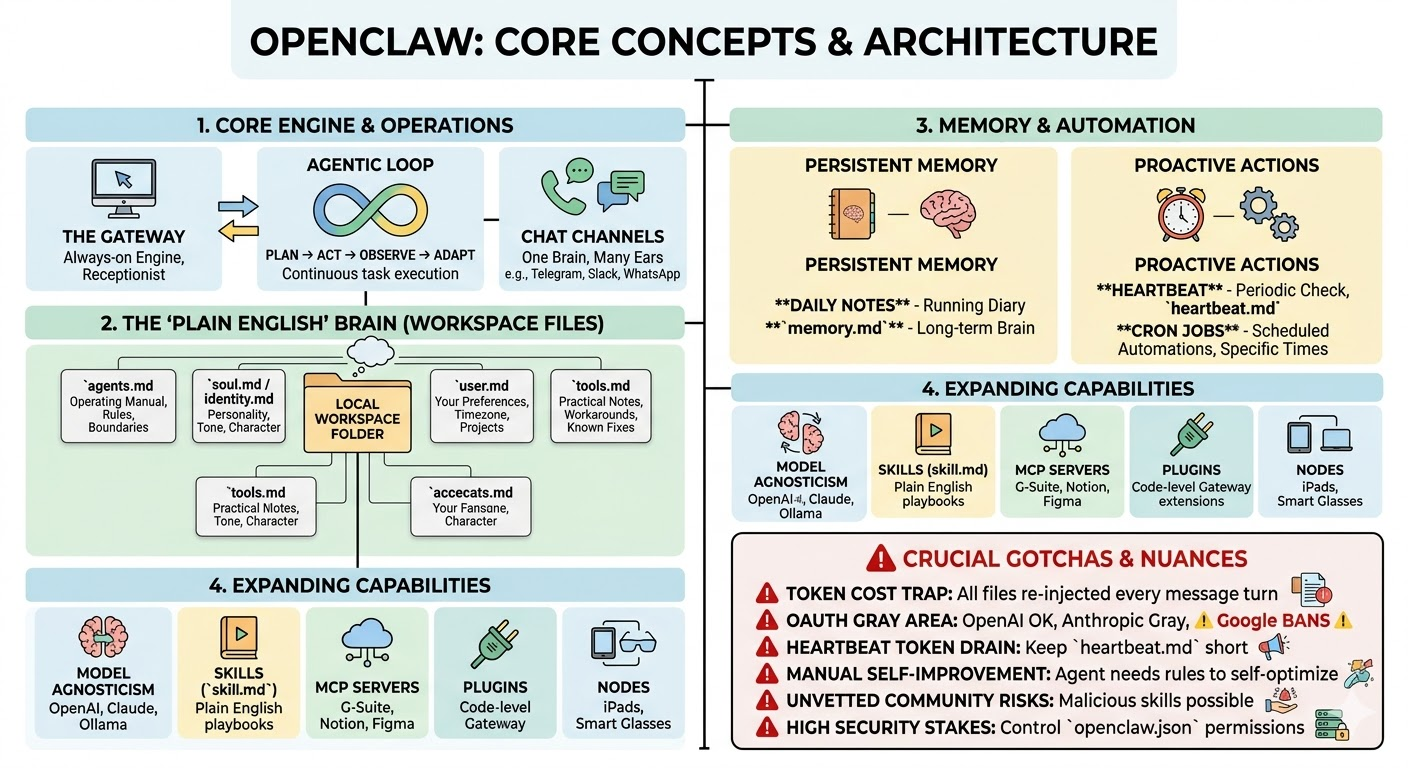
1. Core Architecture & Operations
- The Gateway 06:03: This is the always-on background “engine” or switchboard of OpenClaw. It runs continuously, routes your incoming messages, loads the correct context, and handles scheduling.
- Chat Channels 06:59: OpenClaw operates on the principle of “one brain, many ears.” Channels connect the Gateway to standard messaging apps (like Telegram, WhatsApp, Slack, or Discord) so you can text your agent just like a human coworker.
- Multi-Agent & Sub-Agents 07:35: A single Gateway can run an entire team of isolated agents (e.g., a Personal Assistant, a Dev Agent, a Sales Agent), each with its own workspace, memory, and personality. Main agents can also spin up temporary “sub-agents” 08:46 to independently handle delegated tasks while you continue working with the main agent.
- The Agentic Loop 05:14: This is what separates an agent from a standard chatbot. Instead of a single-turn reply, OpenClaw operates in a loop: it thinks, takes an action, observes the result (like reading an error code), and tries again until the task is fully resolved.
2. The Agent’s Brain: Workspace & Core Files
OpenClaw’s entire memory and configuration live in a local folder called the Workspace 09:05. Instead of complex code, the agent’s logic is defined by plain English markdown text files.
soul.md&identity.md09:54: These define the agent’s personality, tone of voice, character, name, and default emojis.agents.md11:12: The most critical file. This serves as the strict operating manual and establishes boundaries, rules, and priorities (e.g., “Always check calendar first,” or “Never publish without my approval”).user.md12:16: Tells the agent exactly who it works for, storing your timezone, ongoing projects, and communication preferences (e.g., a heads-up that you use voice transcription and might have typos).tools.md12:54: The practical “sticky notes” on the agent’s monitor. It documents custom folder structures, workarounds, and known fixes for the tools the agent uses.
3. Memory, Context, & Proactivity
-
Memory Systems 13:31: OpenClaw does not suffer from chat amnesia. It maintains Daily Notes 13:48 as a running work diary/log, and automatically curates important recurring facts into
memory.md14:06 for long-term retention. -
The Heartbeat 15:01: A periodic check (defaulting to every 30 minutes) where the Gateway wakes the agent up to check
heartbeat.md. The agent can review a custom checklist (like checking for urgent emails) and proactively message you if needed. -
Cron Jobs 16:14: Scheduled automations for highly specific tasks at exact times, such as sending a daily briefing at 7:00 AM or running a health check every Monday.
-
The Context Engine 17:15: Manages the AI’s limited context window (token limit). It automatically summarizes and compresses old data so nothing important drops out when conversations get extremely long.
4. Expanding Capabilities
-
Model Agnosticism 18:45: OpenClaw is not locked into one AI provider. You can switch the “brain” based on task complexity and budget, utilizing models from OpenAI, Anthropic, or even free, locally hosted models like Ollama.
-
Skills (
skill.md) 19:33: Pre-written, plain-English playbooks that teach the agent how to execute a specific, highly customized task. -
MCP Servers (Model Context Protocol) 21:30: Universal power adapters that allow your agent to read and manipulate external services like Google Workspace, Notion, Figma, or GitHub.
-
Plugins 22:12: Unlike skills, plugins are actual code-level extensions (written in TypeScript/Go) that hook directly into the Gateway’s internals to add new messaging channels or alter how memory is managed.
-
Nodes 23:28: Paired companion devices (like iPads or smart glasses) that allow OpenClaw to establish a physical presence across your hardware ecosystem.
⚠️ Crucial Nuances and Gotchas
-
The Token Context Trap: 17:59 Because OpenClaw re-injects all of your core markdown files (rules, memory, user preferences) as a prompt on every single conversational turn, long files can trigger massive token counts.
-
API Keys vs. OAuth Billing Risk: 03:08 Using a pay-as-you-go API key has no ceiling; a runaway agent stuck in an agentic loop could incur massive costs overnight. Using a flat-fee OAuth setup (like ChatGPT Plus) is highly recommended to cap costs, but comes with account risks:
-
The Heartbeat Drain: 15:54 Because the Heartbeat feature wakes the agent repeatedly, keeping a long checklist in
heartbeat.mdwill quickly consume your token limit. Keep this file mostly empty unless necessary. -
Manual Self-Improvement Required: 11:41 The system does not naturally refine its own operating manual. You must explicitly add a “Daily Self-Improvement” rule instructing the agent to reflect at the end of each day and propose updates to its own
agents.mdfile. -
Community Security Risks: 20:34 Community-built skills from platforms like ClawHub are largely unvetted. Since OpenClaw can take direct actions on your computer, downloading malicious skills can be dangerous.
-
Strict Access Control Needed: 24:15 You must actively edit your
openclaw.jsonmaster config file to explicitly deny dangerous tools (like web browsing, if unwanted) and securely whitelist specific users to prevent public access to your agent.