

Obsidian Metadata
Judge Validation (How to trust an automated eval)
Treat any evaluator that makes judgments as a classifier and validate it against trusted human labels. That covers LLM judges, zero-shot classifiers (e.g., Jev), BERT, and logistic regression. You need to know how often it catches failures and how often it raises false alarms. Code that checks a condition directly doesn’t need human labels (see Code-Based Evals).
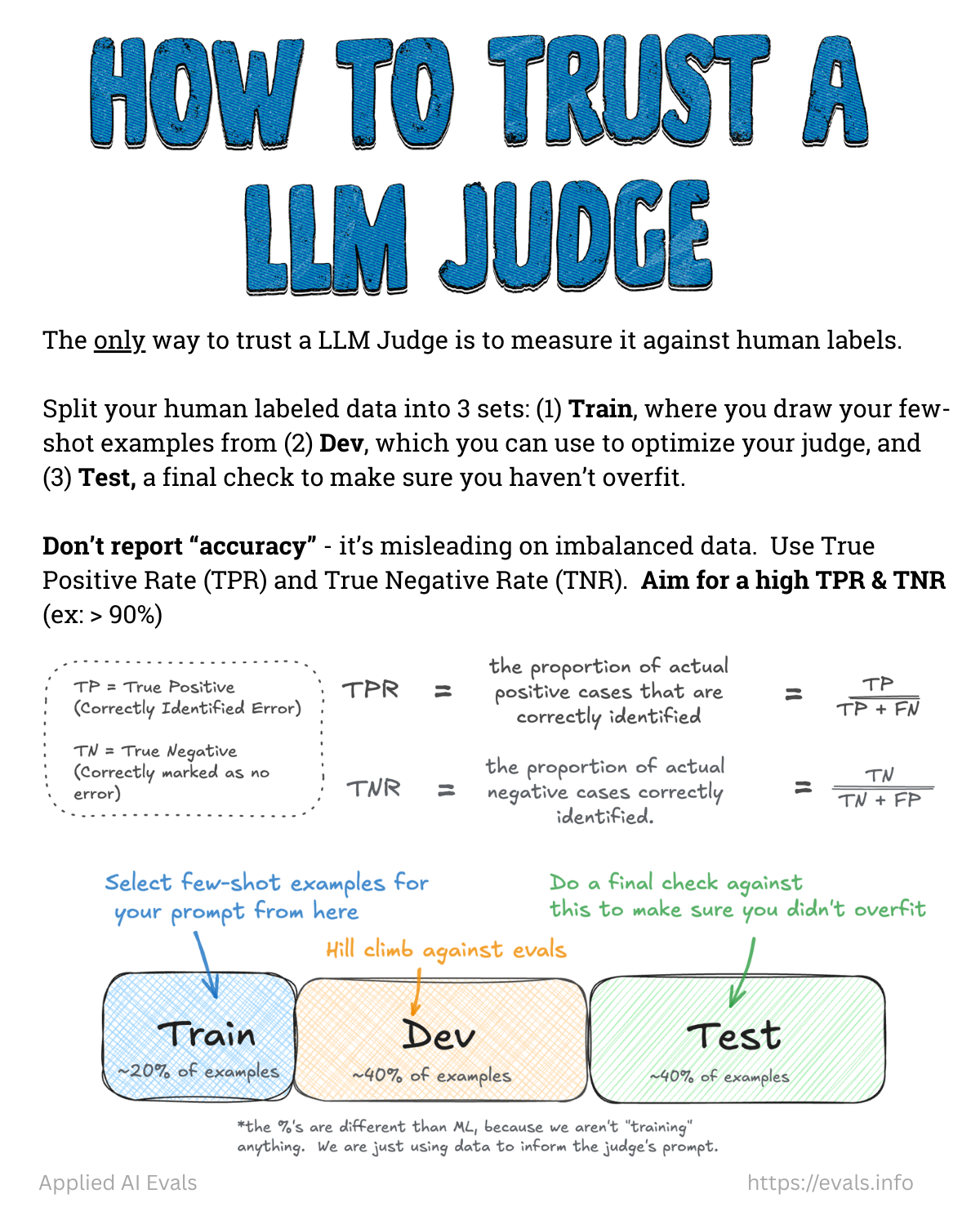
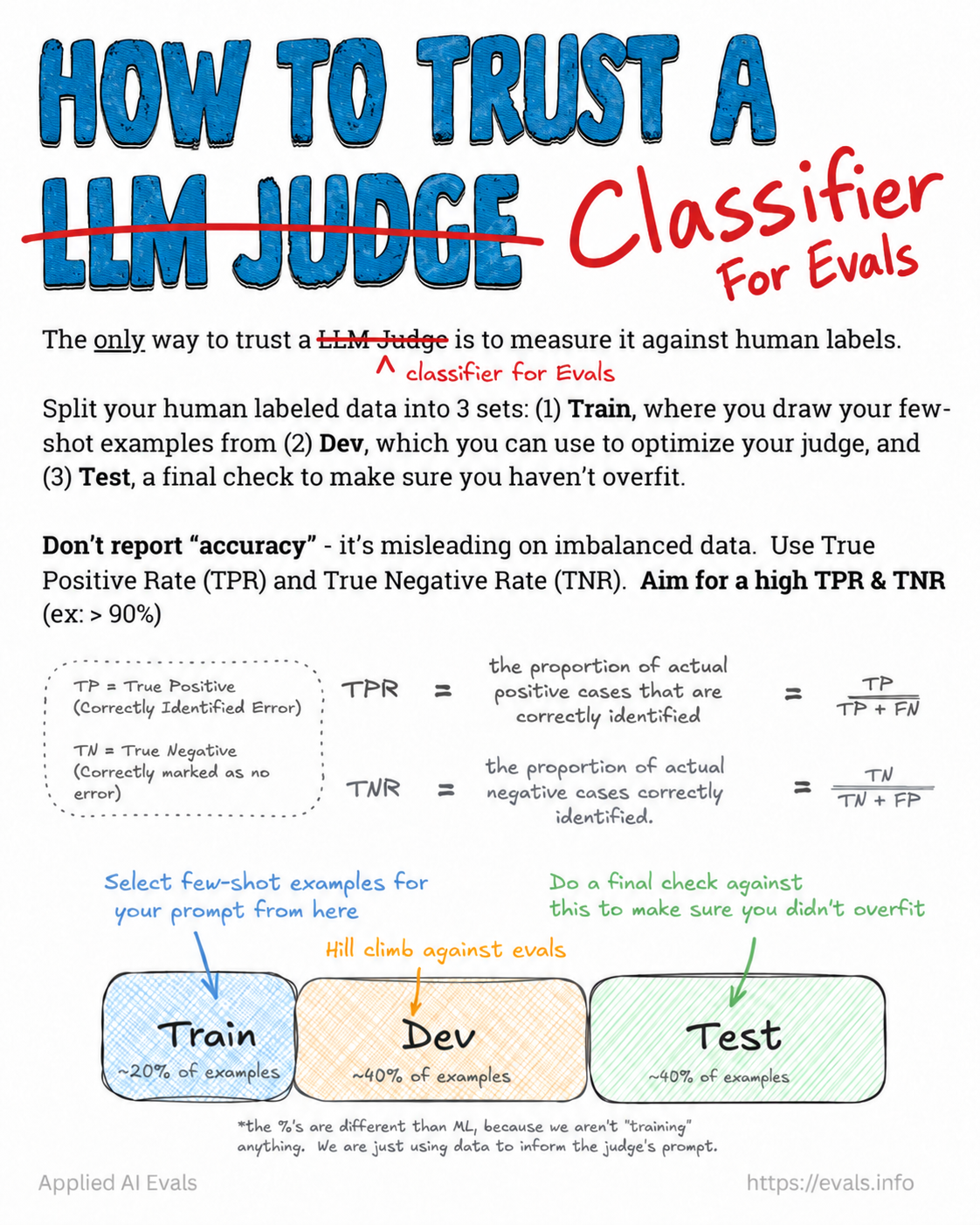 The updated flashcard crosses out “LLM Judge” and replaces it with “Classifier for Evals”.
1. Collect labels
- ~100–200 labeled examples per failure mode from a trusted domain expert (see Benevolent Dictator). Reuse labeled traces from Error Analysis.
- Get enough of both classes: aim for 30–50 Pass and 30–50 Fail in each of dev and test when possible. Use balanced splits even if real prevalence is skewed, so you have enough Fails to measure reliably.
- Below ~60 examples, confidence intervals are usually too wide to support a conclusion.
- Hand-validate every ground-truth label. Never let an LLM produce your ground truth.
2. Split three ways
| Split | Share | Purpose | Rule |
|---|---|---|---|
| Train | 10–20% | Source of few-shot examples in the prompt | Clear-cut Pass and Fail cases |
| Dev | 40–45% | Iterate on the prompt / choose models; a prompt-tuning algorithm (e.g., GEPA) optimizes against this | Never put dev examples in the prompt |
| Test | 40–45% | One final, unbiased check | Don’t look at it during development. Freeze the prompt, run once. |
The percentages differ from classic ML because nothing is being “trained”. The data only informs the prompt. Training a real classifier may need a larger train share.
from sklearn.model_selection import train_test_split
train_dev, test = train_test_split(labeled, test_size=0.4, stratify=labeled['label'], random_state=42)
train, dev = train_test_split(train_dev, test_size=0.75, stratify=train_dev['label'], random_state=42)
# ≈15% train, ≈45% dev, ≈40% test
Why a test set? Every time dev results drive a change, information from dev leaks into the evaluator. After many rounds it can do well on dev and badly on new data. That’s overfitting, and it happens even if dev examples never appear in the prompt. If test is much worse than dev, investigate overfitting (small samples and differences between the sets can also explain a gap). If you overfit, revise, then repeat with a new, untouched test set.
3. Measure TPR and TNR (not accuracy)
Convention alert
The FAQ defines “positive” = error present. The validate-evaluator skill defines “positive” = Pass. Pick one and write it down. Both yield the same two numbers: how well the judge catches failures and how well it passes good outputs.
Using the FAQ convention (positive = failure):
- TPR (recall): of the real failures, what fraction the judge catches. People find 10 failures and the judge catches 8, so TPR = 80%. Prioritize this when a miss is costly.
- TNR: of the good outputs, what fraction the judge correctly passes. People find 100 good outputs and the judge passes 95, so TNR = 95%, with 5 false alarms. High TNR avoids wasting reviewers’ time.
TPR = TP / (TP + FN), TNR = TN / (TN + FP)
Why not accuracy or raw agreement? If an error occurs in 5% of examples, a judge that always says Pass gets 95% agreement and catches zero errors. Raw agreement is only OK when classes are ~50/50 (as in Hamel’s early Honeycomb spreadsheet). Also report precision and recall, not “accuracy” (see Source - The Revenge of the Data Scientist). Use Cohen’s Kappa only for human–human agreement.
Targets: aim for TPR and TNR > 90%; the minimum acceptable is about > 80%. Choose based on the cost of misses vs false alarms. When failures are rare, even a small false-alarm rate creates lots of unnecessary reviews.
from sklearn.metrics import confusion_matrix
tn, fp, fn, tp = confusion_matrix(human, judge, labels=['Fail','Pass']).ravel()  # positive = Pass here
tpr, tnr = tp/(tp+fn), tn/(tn+fp)
4. Inspect disagreements
| Type | Judge | Human | Likely fix |
|---|---|---|---|
| False Pass | Pass | Fail | Judge too lenient. Sharpen the Fail definition, add edge-case examples |
| False Fail | Fail | Pass | Judge too strict. Clarify the Pass definition, adjust examples |
For each: clarify wording, swap or add train examples, add explicit rules, or split the criterion into narrower checks.
When the judge won’t agree with humans
- Collect labels via error analysis (≥ 50 pass and 50 fail).
- Read disagreements manually first. Common causes: missing context, vague instructions, bad labels.
- If you can’t decide whether an example passes, your definition of success needs refining.
- Don’t jump to automated prompt tuning (e.g., GEPA) too early. You’ll miss non-prompt problems.
- One judge per failure type. Don’t grade “overall quality”.
- Escalation table:
| Problem | Solution |
|---|---|
| TPR and TNR both low | More capable judge model |
| One metric low | Inspect that metric’s disagreements specifically |
| Both plateau below target | Decompose into smaller, atomic checks |
| Wrong on certain input types | Targeted few-shot examples from train |
| Labels look inconsistent | Re-examine labels; refine the rubric |
- Always confirm generalization on the held-out test set.
5. After validation
- Apply Judge Bias Correction to estimate the true production failure rate, with a confidence interval.
- Re-validate after changing the judge prompt or model, when the input distribution shifts, or when production CIs widen unexpectedly.
- Keep checking agreement periodically. Alignment is “an ongoing conversation” (see Maintaining Trust in Evals).
Using an agent to optimize the judge prompt
Works once you have (a) one specific failure to detect and (b) labeled examples to measure progress against. “Find all errors and keep improving” is too vague. Keep the test set outside the optimization loop. Cheap, fast classifiers make automated tuning much cheaper, since tuning can take hundreds or thousands of evaluations (see Prompt Optimization).
Related
LLM-as-Judge · Judge Bias Correction · How Many Examples Do You Need · Eval Audit Checklist