

Obsidian Metadata
| type | concept |
| sources | Source - Its Hard to Eval Is a Product Smell, Source - AI Evals FAQ |
Designing for Verification
"'It's hard to eval' is a product smell."
Artifacts that are hard for you to verify are usually hard for users too. In the worst case users have to redo the work from scratch to check it. Designing for ease of verification should come before building evals. — Hamel
Before AI, verification often happened as a side effect of doing the work. With AI, verification is the bottleneck, so design for it explicitly.
Guiding questions
- What does the user actually need to check?
- What trusted thing can they compare it against?
- What signals or heuristics do experts use to verify?
- What smaller units can they accept, edit, or reject?
Learn this by watching an expert work (needfinding): what do they check, and what evidence do they need?
Core patterns
- Provenance. Show where each part came from, with links for more detail. This is the fastest way to make an output checkable.
- Progressive disclosure. Put high-value items (sources, assumptions, open issues) up front and full detail on demand.
- Anchor to something trusted, then show a diff. Start from a vetted artifact and show what changed and why.
- Surface intermediate outputs users can check before the final result (extracted facts, contradictions, open questions).
- Explicitly list what couldn’t be verified instead of presenting it as settled.
- Adapt to trust. Early on, make provenance obvious. Once the user trusts that detail, collapse it by default.
- Even easily verified work benefits. Cursor and Devin record videos of UI changes so you can confirm the work without reproducing it.
The three examples
1. AI data agent (“What was net revenue for Product A last quarter?“)
Before: a single number, 0.7M: no trusted source”; “183 customers unmatched CRM↔Billing”), plus “Open as notebook”. The notebook opens with assumptions, shows the queries and results, breaks the total down by region for sanity checks, and ends with “What I could not verify” as runnable cells. Publishing back to a knowledge base creates a virtuous cycle (like Airbnb’s Knowledge Repo). Hex is the reference product.
How a data scientist validates a metric (and what the product should support): compare with a trusted source · confirm the metric definition · sanity-check a related quantity · look beneath the aggregate · read the query · flag what couldn’t be verified.
2. PE curriculum builder
Before: the teacher enters constraints and gets a whole generated plan to judge from scratch. After: the plan is adapted from a vetted plan another teacher uses (“used at 14 schools, run 30+ times, aligned to SHAPE standards”), with a diff of 2 edits, each with a reason (“shortened to fit 45 minutes”, “matched to your equipment”) and Accept/Reject per edit. Bonus: the product is simpler to build (retrieve a close match and adapt it), and automated evals become tractable. Check that retrieval picked a sensible anchor and that each edit honors the constraints.
3. Workers’-comp medical report (50+ pages)
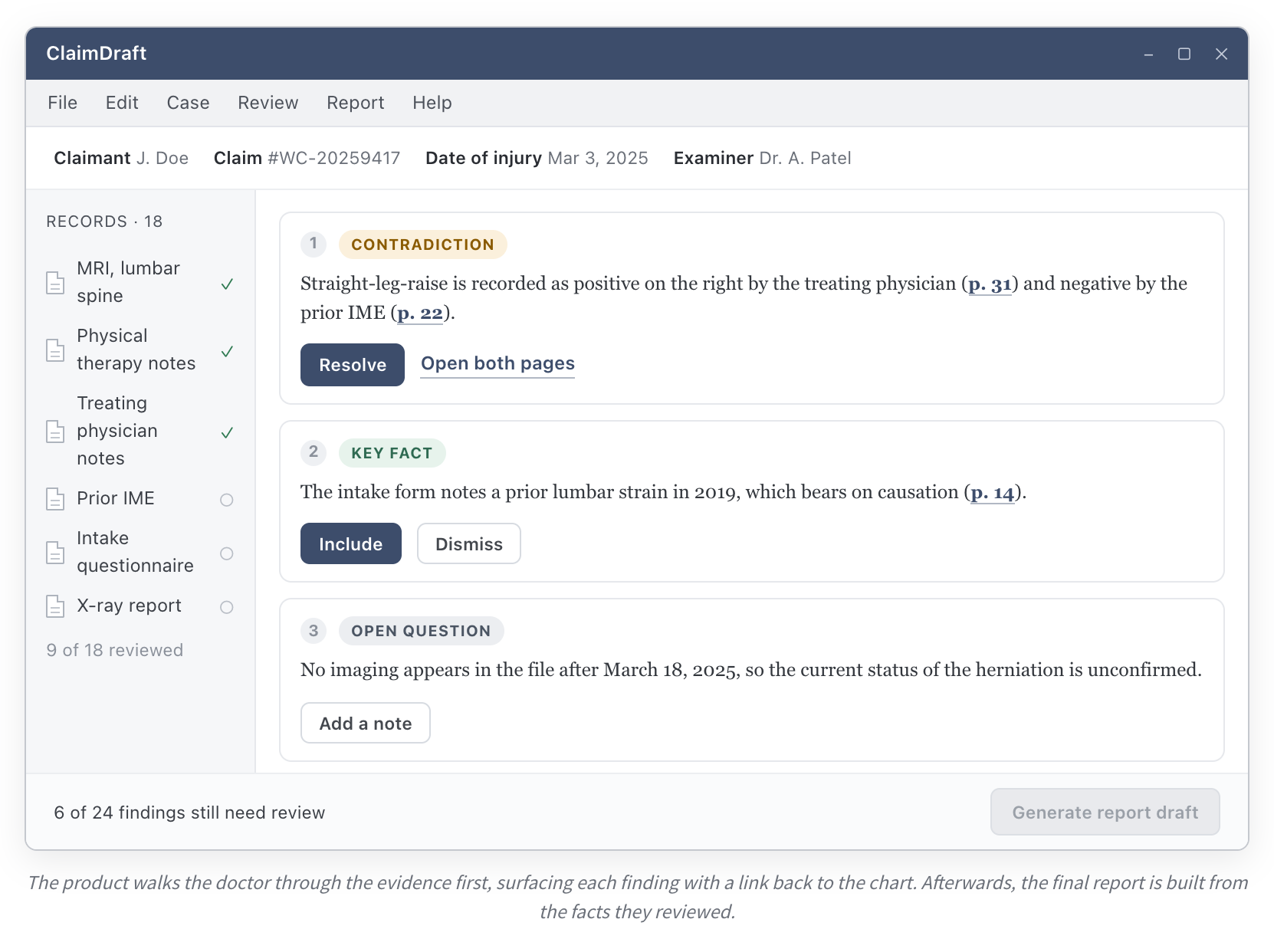
Before: a generated narrative the accountable doctor must re-check against the whole chart, which can take as long as writing it. After: a research assistant, not a report generator. It extracts key facts with page links, surfaces contradictions (“SLR positive p.31 vs negative p.22”), open questions (“no imaging after Mar 18”), and tracks records reviewed. The doctor resolves each one, then generates the report from checked facts. Eval benefit: scoped units to grade, such as “is this contradiction real?” and “does this citation support the claim?”
Why this matters for evals
- Annotation gets cheaper, and evals draw on better signals (user accept/reject/correct actions become labels).
- Smaller, scoped units are far easier to grade automatically than a monolithic output.
- In sensitive-data settings, experts can verify inside the product, which yields eval data you couldn’t otherwise collect (see Evals with Sensitive Data).
- Asking “was the final answer helpful?” tells you too little about what went wrong.
Then remove friction from the review process
After designing the product for verification, make review easy (see Annotation Tools and Review Interfaces) and debug the review process itself:
- Try fewer examples so reviewers have time to inspect each one carefully (this addresses reviewers who rubber-stamp outputs).
- Have people review the same examples independently and discuss disagreements. Disagreement reveals unclear instructions or missing information.
- Review together to see where people get stuck.
Related
Annotation Tools and Review Interfaces · Reviewing Large Traces · Evals with Sensitive Data · Source - Its Hard to Eval Is a Product Smell